
New Styles behaviour in Excel!

There has been a change to th way styles behave in Excel!
Geeks can skip down to the GEEK SECTION below to find out what's changed
IF STYLES ARE NEW TO YOU:
But first, what are styles?
I love styles in Excel - If you haven't come across them before, they are effectively sets of defined formats that can be applied to cells in a single action.
Styles can include any combination of formatting -
📆 Number format,
🔝 Alignment,
✍ Font,
🔲 Borders,
🟨 Fill (colour, pattern, fill effects) and
🔒 Protection
We use styles all the time to apply consistent formatting to different types of cells.
For example,
Input cells with drop down boxes (data validation)
🪄 Pale yellow fill colour
🪄 Green border
🪄 Protection turned off (so you can enter data when sheet protection locked)
Calculation cells
🪄 No fill colour
🪄 Dashed border
🪄 Protection unlocked
These styles can be applied from the Home > Styles > Cell Styles drop down on the ribbon - at Numeritas we use custom shortcuts for speed (see PS below).
GEEK SECTION
What's changed about styles?
They can now all be deleted (except for the Normal style)
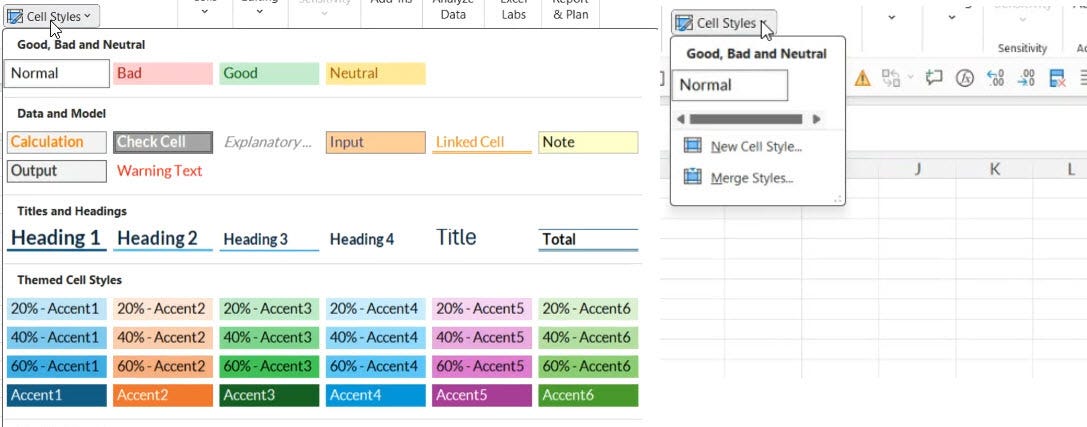
Until recently, the standard styles pictured could not be deleted. But yesterday I discovered they can now all be deleted - except for the Normal style!
I have a handful of macros for dealing with styles - some workbooks have hundreds or even thousands of unwanted, duplicate styles - copied in from other workbooks, so I often want to delete the surplus ones. I was tinkering with one of these macros and discovered that I could delete 'built in' or standard styles - previously an attempt to delete these would be ignored - no error was caused and macros that attempted to delete a built in style simply ignored the delete method instruction in VBA. Now it deletes the 'built-in' style.
GEEK WARNING
If you have any macros that delete styles and took advantage of this 'feature' (not deleting built-in styles) you probably want to go and update the macros.
PS
We have a free styles template you can download, which you can adapt for your own use. Using our free add-in nXt you can use shortcuts to add these styles https://lnkd.in/eZDBqtke